 Malholly
Invitation only · not offered to the public
The run sheet for the TikTok campaigns our team looks after.
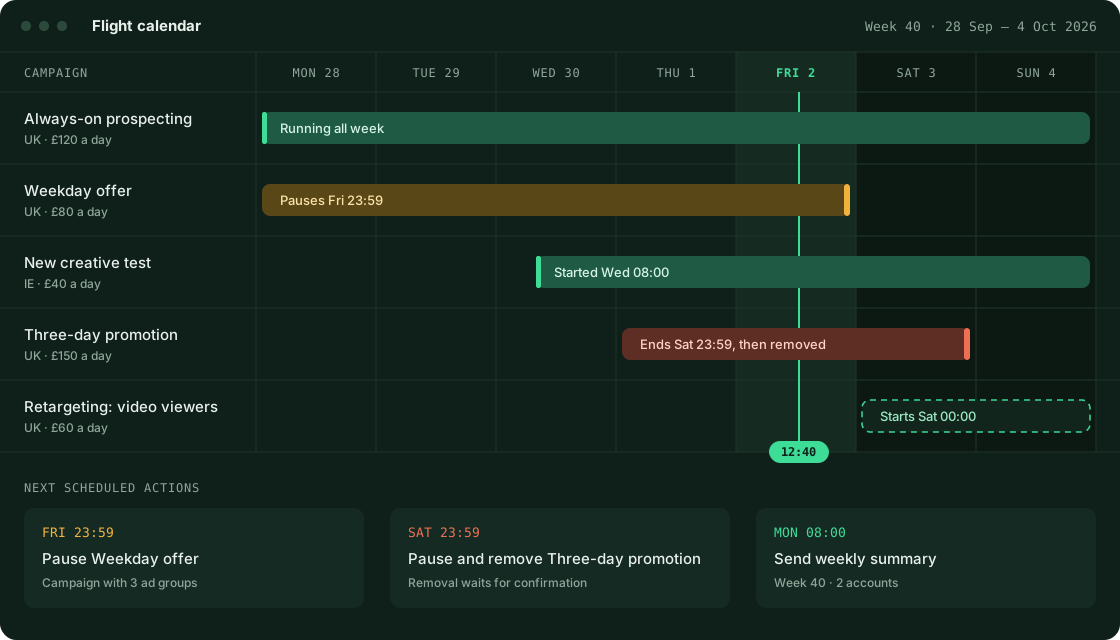
Malholly keeps the start and end date of every campaign in one calendar, switches campaigns on and off when those dates arrive, and writes up the week's results every Monday. It was built so that nobody has to remember to pause something at midnight on a Sunday.
What Malholly does
Malholly is a working tool for a small team. There is no sign-up form and no pricing page, because it is not a product for sale. An advertising account is added only when the person responsible for it approves the connection on TikTok, and it is removed as soon as they withdraw that approval.
Switching on schedule
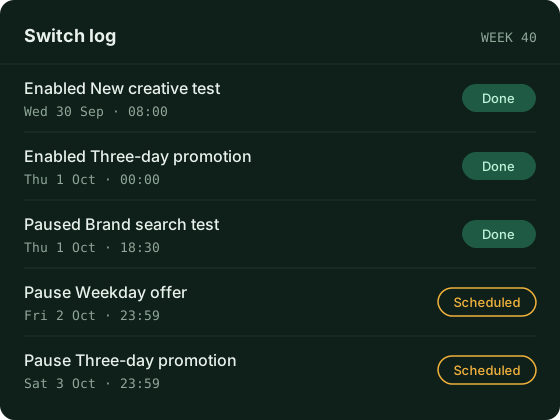
Campaigns, ad groups and ads are enabled and paused at the times set in the calendar, including nights and weekends.
- Every action is written to a log with its time and result.
- If an action fails, it is retried and the team is told.
- Nothing is changed in an account unless a team member scheduled or confirmed it.
The Monday summary
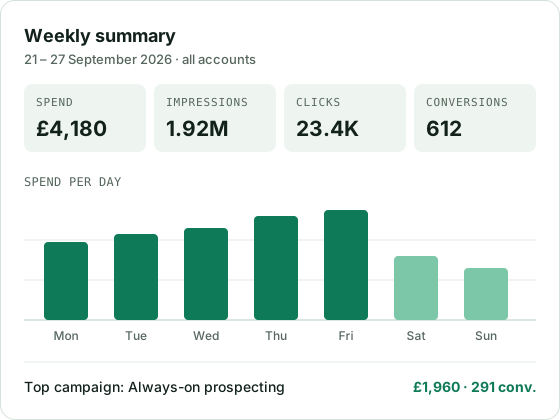
Each Monday morning Malholly puts the previous week into one document, so nobody exports reports from each account by hand.
- Spend, impressions, clicks and conversions per account and per campaign.
- Totals only. No data about individual viewers is collected.
- Amounts are shown in each account's own currency and time zone.
Tidying up finished tests
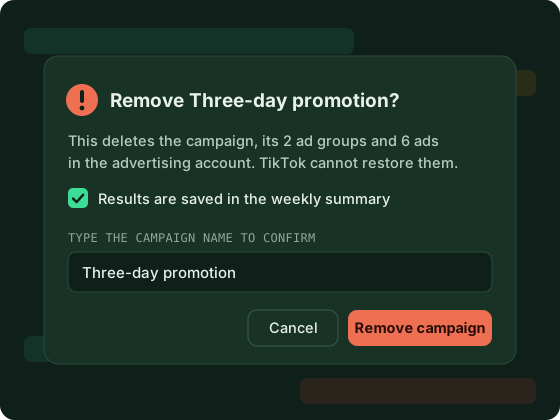
Tests and short promotions that have ended can be removed from the account once their results are recorded, which keeps the account readable.
Removing a campaign, ad group or ad deletes it in the advertising account itself and cannot be reversed. A team member has to confirm each removal by name. This is separate from deleting the records Malholly holds, which is explained on the data removal page.
Permissions requested from the TikTok Marketing API
Malholly asks for three permissions. Each one is needed by a function described above, and none is requested for future use.
| Permission | Access | What it is used for |
|---|---|---|
| Advertiser account information | Read | Listing the connected accounts with their name, currency and time zone, so that scheduled times and reported amounts are correct for each account. |
| Campaigns, ad groups and ads | Read, write, delete | Building the calendar from the account structure, enabling and pausing items at their scheduled times, and removing finished tests when a team member confirms it. |
| Reporting | Read | Collecting the performance figures that go into the Monday summary. |
Malholly does not request access to audiences, creative or video uploads, pixels and events, catalogues, lead forms, comments, or Business Center assets. It has no feature that would use them.
How an account is connected
Connection is by personal invitation. Each account goes through these steps once.
- Invitation The person responsible for the advertising account receives a single-use link from our team.
- Approval on TikTok They sign in to TikTok, review the three permissions and approve them. Malholly never sees their TikTok password.
-
Return
TikTok sends them back to
/oauth/returnon this domain with a one-time code, which Malholly exchanges for an access token. - First sync Malholly reads the account's campaigns and fills in the calendar. From then on it syncs every hour.
- Disconnecting Approval can be withdrawn on TikTok at any moment. Scheduled actions for that account stop immediately and its records are deleted as described under data removal.
Data stored and how long it is kept
Data received through the TikTok Marketing API is used to schedule and report on the connected accounts. It is not sold, not shared with advertising networks or data brokers, not used to profile individuals, and not used to train machine learning models.
- Account details Advertiser ID, account name, currency, time zone
- While the account is connected
- Campaign structure IDs, names, status, schedule and budget of campaigns, ad groups and ads
- 13 months, rolling
- Performance figures Spend, impressions, clicks, conversions, aggregated per day
- 13 months, rolling
- Access and refresh tokens Encrypted, stored on the server only
- Deleted on disconnection
- Action history Which team member scheduled, paused or removed what, and when
- 13 months, rolling
Security
- Tokens are encrypted at rest and are never shown in the interface or written to logs.
- Each team member signs in with their own account and two-step verification. There are no shared logins.
- All connections to Malholly and to this website use HTTPS.
- Removing an item from an advertising account requires a second confirmation and is recorded in the action history.
The full details are in the privacy notice.
Contact
One address handles questions about Malholly, this website, privacy and data removal. We reply within 2 working days.
Operated by
Mal & Holly Limited
Company number 15140057
128 City Road, London, EC1V 2NX